Implicit GPU
Core Mathematical Principals
As you may have guessed from the name, Implicit-GPU uses Implicit Curves as the core model for defining shapes. If you don’t want to read the wiki page, the rest of this section will be a brief primer on the subject.
An implicit curve is a curve that is defined by the locations on a plane where the function applied to that location is $0$. Put another way, given a shape $F$, the outline of $F$ is all the locations where $F(x, y) = 0$. To further simplify things for my application, I’ll make a stronger garuntee about the implicit functions. Not only will they return $0$ on the edges, but they’ll also always return positive numbers when applied outside of the shape, and negative numbers inside the shape.
Shapes
Before you can do interesting things with shapes, you’ve got to have some core building blocks to build scenes out of. The circle and polygon are great places to start!
Circles
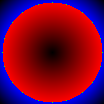 Let's look at a simple example, circles! The function that produces a circle
centered at $(x', y')$ with radius $r$ would be $\sqrt{(x-x')^2 + (y-y')^2} - r = 0$.
Try applying this function to any point; on the edge of the circle, you'd
get $0$; any point _outside_ of the circle a positive number; and any point _inside_
the circle will be negative. The image to the right shows sample positions on a circle
with blue as positive results and red as negative.
Let's look at a simple example, circles! The function that produces a circle
centered at $(x', y')$ with radius $r$ would be $\sqrt{(x-x')^2 + (y-y')^2} - r = 0$.
Try applying this function to any point; on the edge of the circle, you'd
get $0$; any point _outside_ of the circle a positive number; and any point _inside_
the circle will be negative. The image to the right shows sample positions on a circle
with blue as positive results and red as negative.Polygons
Unlike circles, the algorithm for polygons are a bit more complex, requiring iterating over every line segment, finding the distance to the line segment and then negating the distance if the point query lies on the “inside” of the line segment.
In order to determine if a point is on the “inside” or “outside” of a line segment, all polygons are encoded as points progresing in a clockwise winding order. Then, determining if a point is on one side of the line segment or the other only requires looking at the sign on $(x’’ - x’) * (y - y’) - (y’’ - y’) * (x - x’’)$ where $(x, y)$ is the sampling point, $(x’, y’)$ is the first point of the line segment, and $(x’’, y’’)$ is the second.
Operations
The real killer feature of implicit geometry is how easy it is to represent operations on shapes. The most basic of these are the traditional “venn diagram” operations.
Negation
The negation operator takes a shape and returns a shape that has it’s insides and outsides flipped. While not incredibly useful by itself, negating a shape is handy in defining further operations.
Image Here
$\text{negate}(A(x, y)) = -A(x, y)$
Intersection
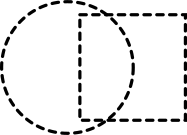
The intersection operator takes two shapes and returns a new shape that contains only the area that was contained inside of both shapes.
$\text{intersect}(A(x, y), B(x, y)) = \text{min}(A(x, y), B(x, y))$
| $A, B$ | $\text{intersect}(A, B)$ |
|---|---|
 |  |
Union
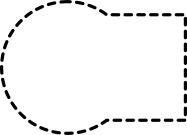
The union operator takes two shapes and returns a new shape that contains the area that was contained inside of either shape.
$\text{union}(A(x, y), B(x, y)) = \text{max}(A(x, y), B(x, y))$
| $A, B$ | $\text{union}(A, B)$ |
|---|---|
|  |
Subtract
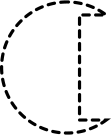
The subtraction operator takes a target shape and a cutting shape and subtracts the cutting shape out of the target shape. You’ll notice that this operator is defined in terms of previous operators: $\text{union}$ and $\text{negate}$.
$\text{subtract}(Target(x, y), Cut(x, y)) = \text{union}(Target(x, y), \text{negate}(Cut(x, y)))$
| $Target, Cut$ | $\text{subtract}(Target, Cut)$ |
|---|---|
|  |